

Start watering from the sofa, push back a cycle when rain is on the way, check from a distance that everything is working: you can do all of this with a Bluetooth irrigation controller or a Wi-Fi module. Here is how to choose, and then how to get set up.
Bluetooth or Wi-Fi: the difference in a nutshell
- Bluetooth: your phone talks directly to the controller when you are nearby. No hub, no router: ideal for a valve box or a far corner of the garden with no power socket.
- Wi-Fi: the controller connects to your home internet router. You can control it from anywhere, with alerts and weather-based adjustments.
Battery-powered Bluetooth: watering where there is no power socket
These controllers sit close to the valve, often in a buried valve box, and are set up from an app.
- Hunter: the NODE-BT-100-VALVE-B (1 station, supplied fitted to a valve), the NODE-BT-200 (2 stations) and the NODE-BT-400 (4 stations), all with Bluetooth 5.0.
- Rain Bird: the ESP-BAT-BT range, from 1 station to 6 stations, with the Rain Bird 2.0 app. For example, the ESP-BAT-BT-2 runs on 4 AA batteries, offers 4 programmes with 8 start times each and an IP68 casing; battery life can reach 5 years depending on the watering schedule.
- Solem: the BL-IP and WooBee IP68, from 1 to 6 stations, programmed with the MySolem app.
These models operate latching (pulse) solenoid valves: each product page lists the compatible solenoid.
Wi-Fi: two ways to get connected
1. Choose a controller that is already Wi-Fi enabled. The Rain Bird RC2I4-230 (4 stations, indoor) is controlled with the Rain Bird app. From Solem, the SMART-IS (2 to 12 stations, with MySolem) and the Villa (built-in Wi-Fi and Bluetooth, 4 to 12 stations) suit gardens of every size. From Hunter, the PHC-601E, PHC-1201E and PHC-2401E are controlled through the Hydrawise platform.
2. Add a Wi-Fi module to a compatible controller. This is the easiest way to upgrade an existing installation.
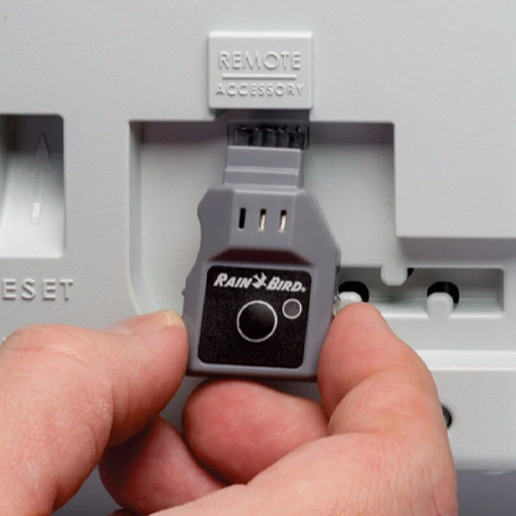
- The Rain Bird LNK2 Wi-Fi module slots into ESP-TM2 and ESP-ME3 controllers (as well as recent ESP-ME and RZXe models). It adds the Rain Bird 2.0 app, seasonal adjustment, rain delay when rain is forecast, and alerts. It works on a 2.4 GHz Wi-Fi network.
- The Hunter WAND Wi-Fi module connects Hunter X2, PHC and HPC controllers to the Hydrawise platform, with watering adjusted to local weather data.
Setting up the LNK2 in 6 steps
- Download the Rain Bird app to your phone.
- Check that the Wi-Fi signal reaches the spot where your controller is installed.
- Open the front panel of the controller and insert the module into the accessory slot.
- Check that the indicator light is flashing alternately red and green (if not, press the button on the module).
- In the app, add a controller and follow the steps: your phone briefly connects to the Wi-Fi network whose name contains “Rain Bird”.
- Run a test watering from the app.
To start again from scratch, hold down the button on the module for more than 5 seconds. Before ordering, look for the Wi-Fi symbol on the front of your controller: Rain Bird states that only models made after 2 November 2016 have it.
Which option for which garden?
- No power socket: a battery-powered Bluetooth controller (NODE-BT, ESP-BAT-BT or BL-IP).
- Power socket available and you want remote control: an RC2I4-230 or a SMART-IS.
- Already have an ESP-TM2 or ESP-ME3: simply add the LNK2.
- Plan to add more zones: the modular ESP-ME3 and its expansion modules.
To complete your system, add a rain sensor: watering stops by itself when it rains.
Questions about compatibility? Email info@arrosagepro.com with the model of your controller.
Official sources: LNK2 module guide · LNK2 user guide (Rain Bird PDF) · LNK module setup